Chapter 20: System software
The purposes of an operating system (OS)
Operating system structure
- user mode - available for the user or an application program
- kernel mode - kernel mode has sole access to part of the memory and to certain system functions that user mode cannot access
Layered structure
- Two modes of operation are
separated. - The
kernel runs all of the time. - The
remainderof the OS runs inuser modeso individual parts areonly accessed when needed. Application programsorutility programscould make system calls to the kernel.- each
higher layerneeds tobe fully servicedby alower layer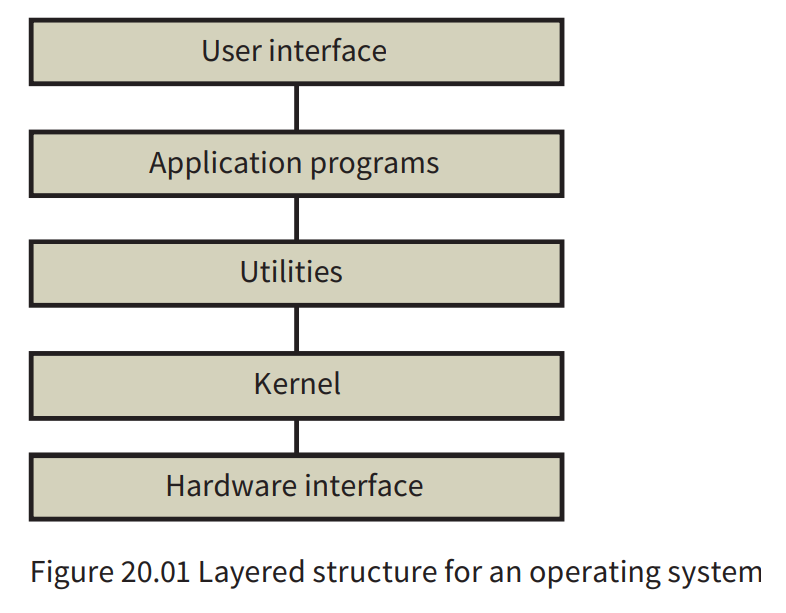
Modular structure
- The structure works by the kernel calling on the individual services when required. It could be associated
with a micro\-kernel structurewhere the functionality in the kernel is reduced to the absolute minimum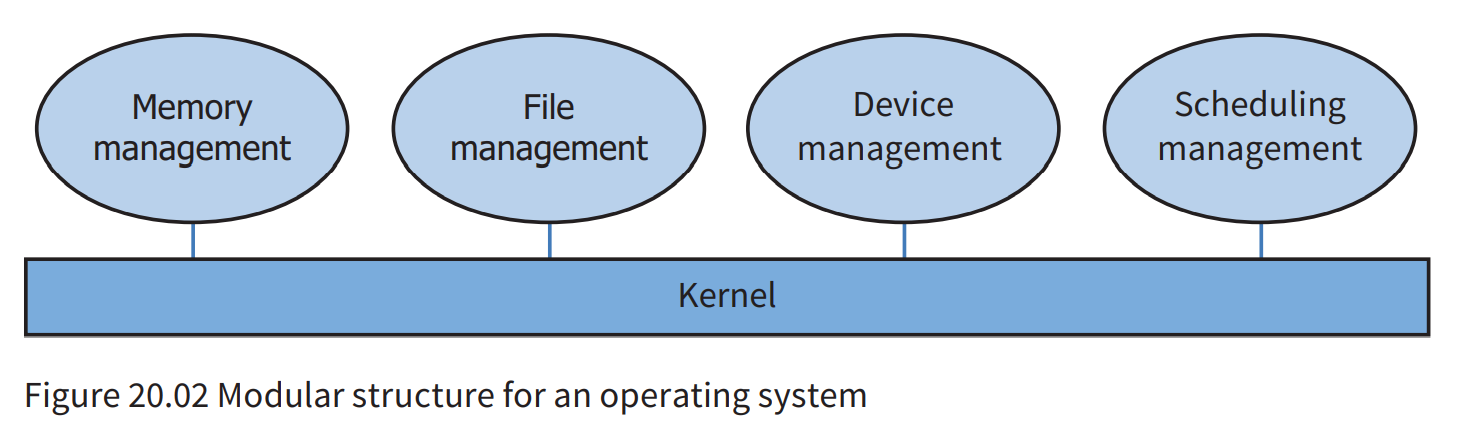
The input/output (I/O) system
- The I/O system does not just relate to input and output that directly
involves a computer user. It also includesinput and output to storage deviceswhile a program is running.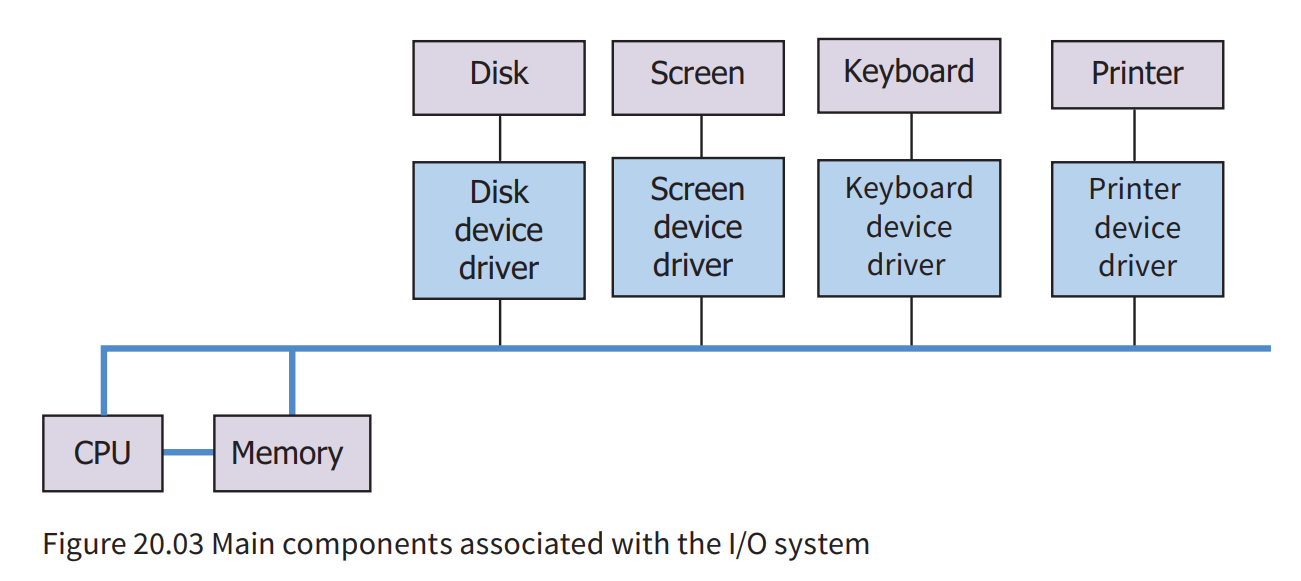
- The operating system can ensure that
I/O passes via the CPUbut for large quantities of data the operating system can ensuredirect transfer between memory and an I/O device. - Management of CPU usage is vital to
ensure that the CPU does not remain idle while I/O is taking place.
Process scheduling
-
ensure efficient usage
-
Programs stored on disk
-
A
long-termorhigh-level schedulerprogram controls the selection ofa program stored on disk to be moved into main memory. -
Occasionally a program has to be taken
back to diskdue to the memory gettingovercrowded. -
When the program is installed in memory,
a short-termorlow-level schedulercontrols when it has access to the CPU. -
High-level scheduler - makes decisions about which program stored on disk should be moved into memory
-
Low-level scheduler - makes decisions about which process stored in memory should have access to the CPU
Process states
-
At this stage a
process control block (PCB)can be created in memory ready to receive data when the process is executed. -
The transitions between the states shown in Figure 20.05 can be described as follows.
-
A
new processarrives in memory and a PCB is created; it changes to theready state. -
A process in the ready state is
given access to the CPU by the dispatcher; it changes to therunning state. -
A process in the running state is
halted by an interrupt; it returns to theready state. -
A process in the running state
cannot progress until some event has occurred (I/O perhaps); it changes to thewaiting state(sometimes called the ‘suspended’ or ‘blocked’ state). -
A process in the waiting state is
notified that an event is completed; it returns to theready state. -
A process in the running state
completes execution; it changes to theterminated state.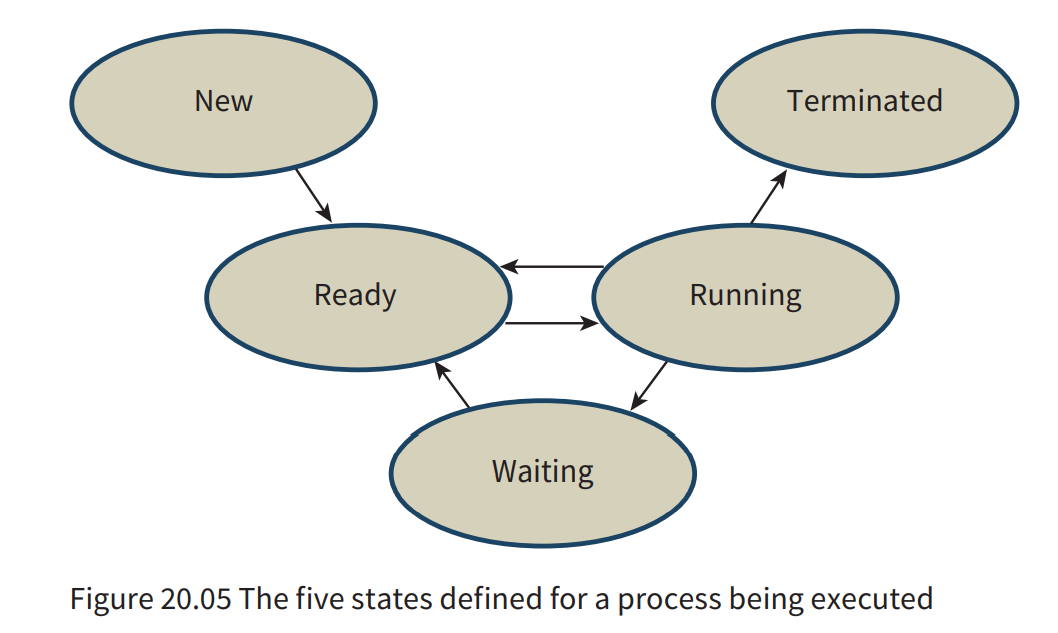
-
Process - a program in memory that has an associated process control block
-
Process control block (PCB) - a complex data structure containing all data relevant to the running of a process
-
Thread - part of a program which is handled as an individual process when being executed
Interrupts
- Processes consist of alternating periods of CPU usage and I/O usage.
- The scheduler decides to halt the process for one of several reasons.
- OS kernel must invoke an interrupt-handling routine when interrupt occurs
Scheduling algorithms
-
Preemptive(抢占式) or Non-preemptive(非抢占式).
-
A preemptive algorithm can halt a process that would otherwise continue running undisturbed. If an algorithm is preemptive it may involve prioritising processes.
-
First come first served (FCFS)
- This is a
non-preemptivealgorithm and can be implemented by placing the processes in afirst-in first-out (FIFO) queue - inefficient
- This is a
-
A round-robin algorithm
- allocates a time slice to each process
- preemptive
- a process will be halted when its time slice has run out
- can be implemented as a
FIFO queue - does not involve prioritising processes
-
A priority-based scheduling algorithm
- a new process enters the ready queue or be halted
- the priorities have to be re-evaluated
Memory management
Partitions and segments
Paging and virtual memory
- Segmentation - where a large process is divided into segments for loading into memory but the segments are not constrained to be the same size
- Paging - where a large process is divided into pages which have to be the same size
- Virtual memory - a paging mechanism that allows a program to use more memory addresses than are available in main memory
- Disk thrashing - when paging is being used and a repetitive state has been reached where loading one page causes a need for another page to be loaded almost immediately but the loading of this new page causes the same immediate need
Operating system facilities provided for the user
- user interface
- allow the user to interact with running programs
- device driver
- a file system
- store data and programs
- supports the provision of a programming environment
- provides a set of system calls that provide an interface to the services it offers
- Application programming interface (API) - Each API call fulfils a specific function such as creating a screen icon. The API might use one or more system calls. The API concept aims to provide portability for a program, where a program can run on diff erent operating systems with minimal changes.
Translation software
- A compiler can be described as having a ‘
front end’ and a ‘back end’. - The
front-end programperforms analysis of the source code and unless errors are found producesan intermediate codethat expresses completely themeaning of the source code. Theback-end programthen takes this intermediate code as input and performssynthesis of object code.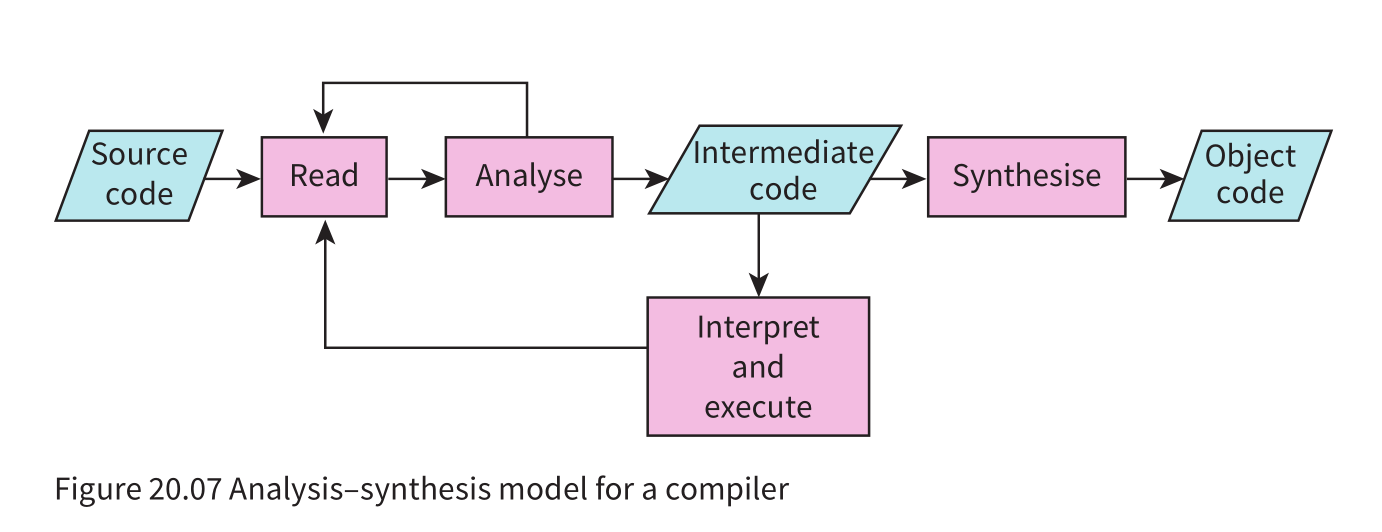
Front-end analysis stages
- Front-end analysis stages The four stages of front-end analysis, shown in Figure 20.08, are: - lexical analysis - syntax analysis - semantic analysis - intermediate code generation
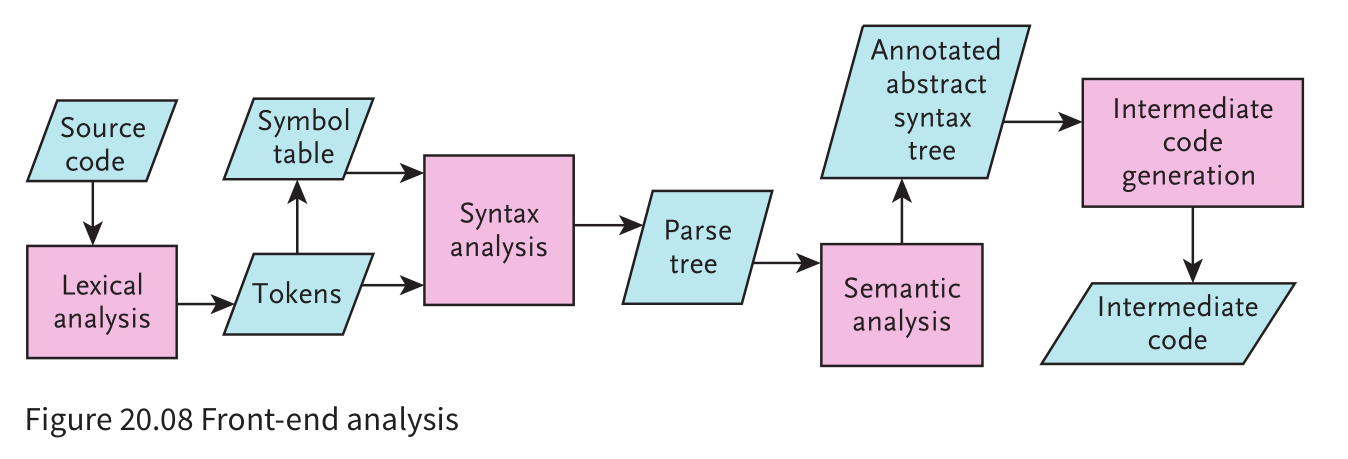
- lexeme - meaningful individual character or collection of characters
- an identifier
- a keyword
- operator or symbol
- ······
- One approach to
lexical analysisis first to remove all white space and all comments then to take each line of source code and identify each lexeme. This is apattern-matching exercise. - For each identifier recognized there must be an entry made in the symbol table.
- Symbol table: a data structure in which each record contains the name and attributes of an identifier
Representation of the grammar of a language
- One method of presenting the grammar rules is a
syntax diagram. A syntax diagram is only used in the context of a language. It has limited use because it cannot be incorporated into a compiler program as an algorithm - A syntax diagram is only used in the context of a language. It has limited use because it cannot be incorporated into a compiler program as an algorithm.
- An alternative approach is to use
Backus–Naur Form (BNF).- The use of
|is to separate individual options - The
::=characters can be read as ‘is defined as’ - Note the recursive definition of
<Identifier>in this particular version of BNF
- The use of
- Example:
|
|
- BNF is a general approach which can be used to describe any assembly of data. Furthermore, it can be used as the basis for an algorithm.
Back-end synthesis stages
-
If the front-end analysis has established that there are syntax errors,
the only back-end process is the presentation of a list of these errors. For each error, there will be an explanation and the location within the program source code. -
If no errors, the main back-end stage is
generating machine code from the intermediate code. -
Machine code generation may involve
optimisationof the code. The aim of optimisation is to create anefficientprogram.- One type of optimisation focuses on
features that were inherentin theoriginal source codeand have been propagated into the intermediate code. - The other type of optimisation is instigated when the
machine codehas been created. This type of optimisation mayinvolve efficient use of registers or of memory.
- One type of optimisation focuses on
Evaluation of expressions
- An assignment statement often has an algebraic expression defining a new value for an identifier. The expression can be evaluated by first converting the infix representation in the code to Reverse Polish Notation (RPN). RPN is a postfix representation which never requires brackets and has no rules of precedence.
Evaluating an RPN expression
- Example question:
Describe the main steps in the evaluation of RPN expression using a stack.
- Working from left to right in the expression
- If element is a number PUSH that number onto the stack
- If element is an operator then POP the first two numbers from stack…
- … perform that operation on those numbers
- PUSH result back onto stack
- End once the last item in the expression has been dealt with
The infix expression 8*(5-2)-30 / (2*3) converts to:
|
|
in Reverse Polish Notation(RPN).
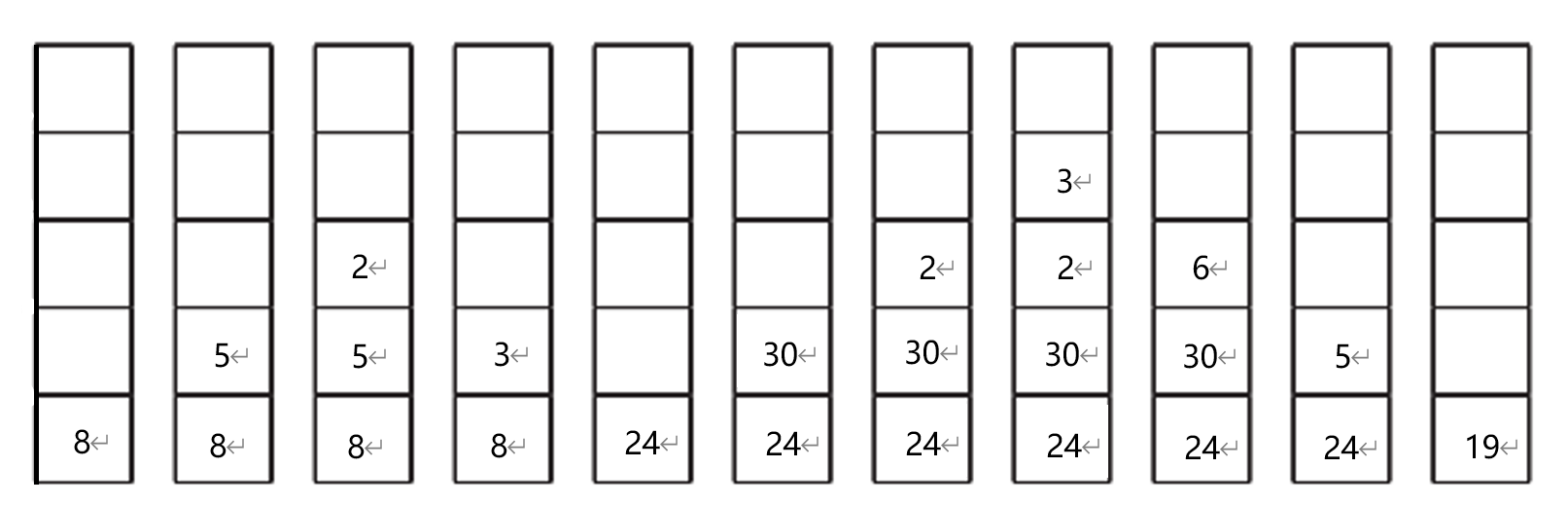
Show the changing contents of the stack as this RPN expression is evaluated.